SWITCHBACK™
Bidirectional character delay · Fireball Audio
Every other delay repeats the same sound, quieter. This one sends it somewhere.
A delay is a loop: sound goes in, comes back a moment later, and part of what comes back is fed in again. In almost every delay ever built, the only thing that happens on each lap is that the level drops.
Switchback puts three stages inside that loop — direction, pitch and dispersion. Because they are inside it, each one is applied again on every lap, so the eighth repeat has had them applied eight times. Move Evolve below and watch the two rows come apart.
The panel
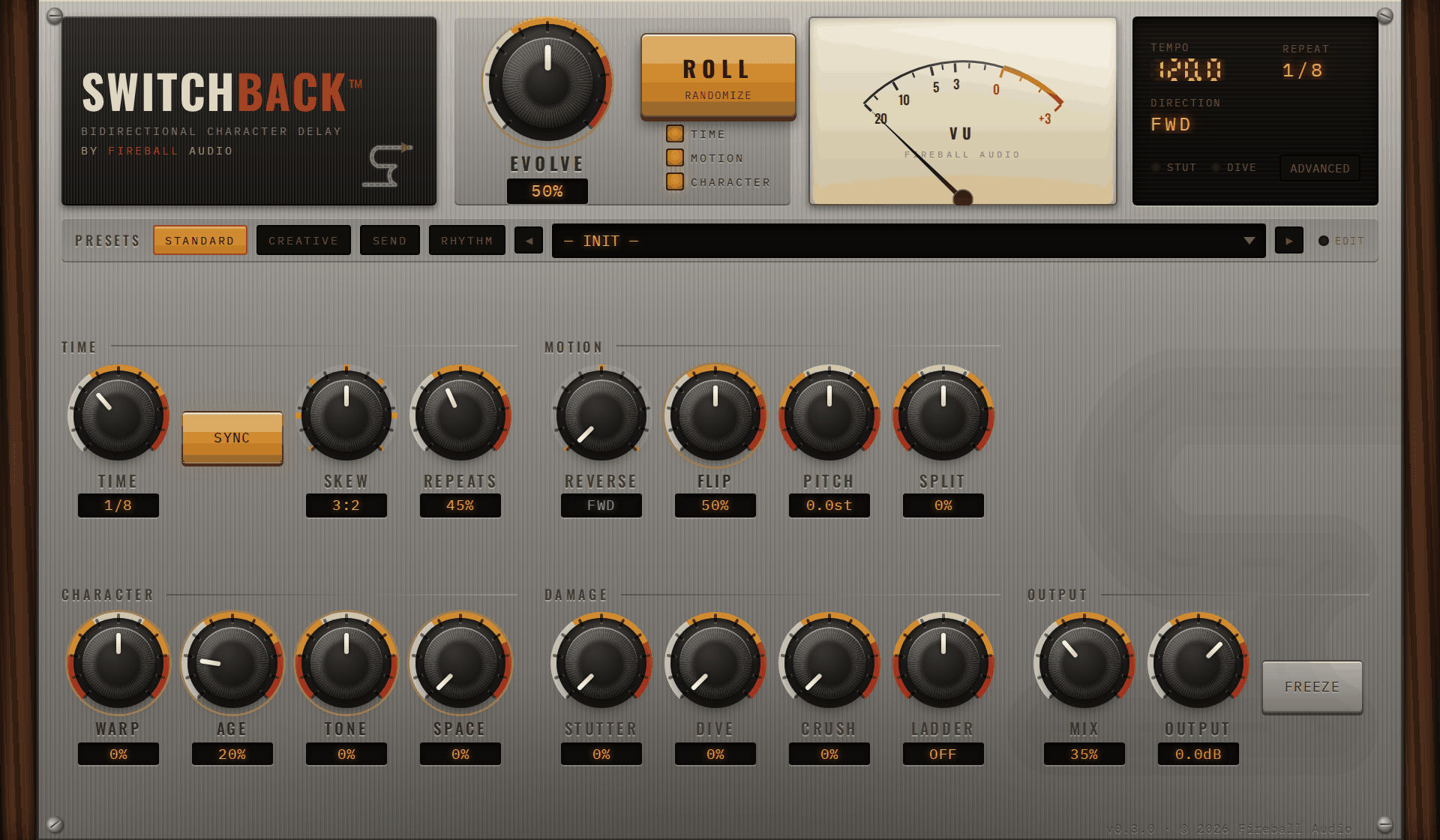
Twenty controls on the front, eleven in a drawer
Everything is laid out in the order you reach for it: when the repeats happen, where they go, what they sound like, and how much of them you hear. Values are read off lit amber windows, because every number this machine reports should look like a number a machine reported.
The trajectory
Eight repeats, the same note played once
Why it compounds
One edge moves, and the whole behaviour changes
Both machines below have the same parts. The only difference is which side of the feedback path the character stages sit on — and that single edge is the entire product.
What is in the loop
Three stages, two of which one knob scales
Direction
Repeats turn around and play backwards. Because the reversal happens inside the loop it compounds — a repeat reversed twice is forwards again, which is why Palindrome produces a schedule rather than an alternation.
F F R R F F R R at Flip N = 2
Pitch
A shift applied once per lap. Nothing counts the repeats and nothing schedules them; the staircase falls out of the loop for free.
repeat n sits at n × P semitones
Dispersion
Sixty-four allpass sections delay different frequencies by different amounts, so a transient smears into a chirp — downward like a spring, or upward, which a first-order chain cannot do at all.
27 ms spread, 100 Hz against 5 kHz
Evolve scales the per-lap depths — pitch, dispersion, the filter walking down, the tape wearing out. At a hundred the eighth repeat has nothing to do with what you played.
Direction is deliberately not one of them. It is a mode with its own control, and a mode that silently does nothing because a different knob is turned down is a hidden dependency rather than a feature. So Palindrome still flips at Evolve zero — set Reverse to Forward and turn Evolve down and you have a very good conventional tape delay, which is the other thing this is supposed to be.
Every control
What each one does, and what it does to the sound
Each control below gets the same picture twice — the repeats with it turned down, and with it turned up. They are all the same drawing, so once you have read one you can read all of them by looking only at what changed.
Evolve
The one knob that decides how far the repeats travelThe master control. At zero the repeats are all the same sound getting quieter, like any other delay. As you turn it up, each repeat drifts further from the one before — higher, blurrier, more worn. It is the difference between an echo and a journey.
Time
When the repeats happenHow long you wait for the first repeat. Short is a slapback that thickens a vocal; long is an echo you hear as a separate event. With Sync on, the knob still sweeps smoothly under your hand but the readout steps to whole note values.
Locks the repeats to your song's tempo so they land on the beat instead of wherever they happen to fall. On unless you want the delay drifting against the track on purpose.
Sets the right-hand repeats to a different speed from the left, locked to a musical ratio. This is the quickest way to make a delay sound wide and alive rather than like the same echo twice. At 3:2 the two sides pull against each other and only meet occasionally.
How much of each repeat is sent round again — so, how many you get. Low is one slap. High keeps going for a long time. Past about 85% it stops fading at all and starts to sustain, and it cannot run away: there is a limiter inside the loop holding it.
Motion
Where they go and what note they areRepeats can play backwards. Forward is normal; Reverse turns them all around, so each one swells into its own attack; Palindrome alternates, some forwards and some back, on a repeating pattern.
How often the repeats turn around. Low is long stretches going one way before a slow turn. High flips constantly, and at the very top the turns stop being smooth and start being audible edits — which is the point.
Shifts each repeat up or down — and because it happens on every lap, it stacks. Set it to seven semitones and the repeats climb a fifth at a time, walking away up a staircase instead of sitting on one note.
Pushes the left and right repeats apart in pitch, one up and one down. A small amount is a gentle chorus; a large amount is two instruments playing the same part in different keys.
Character
What they sound likeSmears a sharp sound into a whistle. Turn it right and the low frequencies arrive late, which is the sproing of a spring reverb; turn it left and the highs arrive late instead, a rising chirp. Past two-thirds either way the smear starts to ring on a pitch of its own.
Everything that happens to a tape machine as it gets worse, on one knob: the top end wears off, the pitch wobbles, dirt builds up and a noise floor creeps in. The noise stays off for the first eighth of the travel, so a little Age does not put hiss on a quiet track.
The colour of the repeats, as one tilt. Middle is a classic tape echo — warm, a little dark. Right opens it up and the repeats stay bright. Left closes it down until they sound like a transistor radio two rooms away.
How far the repeats travel from the middle. It starts by bouncing them between left and right, then widens the image, and in the last third the whole thing begins to drift around you rather than sitting still.
Damage
Four engines whose whole purpose is to be obviousChops the repeats into a rhythmic gate, locked to the delay time so it stays in step. It works on the output rather than inside the loop, so it never turns the tail to mush — it cuts it up cleanly.
A tape stop. The repeats slow down and drop in pitch as though someone put a thumb on the reel. It really does bend the pitch rather than just fading out, which is the difference between a tape stop and a volume fade.
Digital damage. The lower half of the knob coarsens the sound in steps, like an old sampler; the upper half throws away detail until the repeats are gritty and metallic. At zero it does nothing whatsoever.
Six extra taps at multiples of the delay time, each tuned to a note in a scale — an arpeggio built out of the echo itself. When Ladder is on, the ordinary pitch control stands down so the two are never fighting.
Which notes the Ladder is allowed to land on. Octaves is the safest and sits under almost anything; Chromatic will go outside the key on purpose.
The root note the Ladder's scale is measured from. Set it to the key of your track and the extra taps become part of the arrangement rather than a decoration sitting next to it.
Output
How the plugin sits in your trackCatches whatever is in the delay right now and holds it, ignoring anything new you play. The held loop does not fade — it will sit there for as long as you leave it.
How much delay you hear against the original. The Send bank presets are at 100%, which on a normal track means you hear only the echo — those are meant for an effects send, not a channel.
The level of everything leaving the plugin. Useful when a preset is hotter or quieter than the one before it and you want the comparison fair.
Advanced
In the drawer: the nine no macro coversShifts the right side a few milliseconds against the left, on top of Skew. A small nudge widens the image; past about twenty milliseconds your ear stops hearing width and starts hearing two separate hits.
What happens when the delay time changes while sound is in the loop. Digital re-times cleanly and quietly. Tape bends the pitch on the way, the way a machine does when it changes speed — usually the more musical of the two, and the reason automating Time is fun.
How long that change takes. Short is a snap to the new time; long is a slow slide you can hear as a swoop.
Whether a reversal is measured against the repeat before it or against the original sound. Relative lets the reversals stack, so two of them put you back the right way round. Absolute keeps referring to the source.
Pitch again, but in tiny amounts — for detuning rather than for intervals. A few cents per repeat is the slow sour drift of a tape machine that needs servicing.
How the pitch shift is done. Tape changes the speed, so the repeats move in pitch and in time together. Repitch holds the timing still and moves only the pitch. Slip is reserved for a future version and currently behaves as Repitch.
Makes the filter ring at its corner, so the repeats acquire a pitch of their own that was not in what you played. A little adds focus; a lot turns the tail into a note.
Extra playback heads, like a multi-head tape echo. Heads two and three are taps inside the delay time rather than extra repeats, so switching them on gives you three hits per repeat instead of three times as many repeats.
Blurs the repeats into each other. Low keeps them countable, so you hear individual echoes. High turns them into a wash where you stop being able to pick out where one ends and the next begins.
ROLL
button, with three tick-boxesDraws a whole new setting using the same rules the four hundred factory presets were built from, so it gives you something usable rather than something random. The three tick-boxes decide what is allowed to move: TIME, MOTION, CHARACTER. Mix, Output and Freeze never move, because those are how the plugin sits in your session rather than what it sounds like. The most useful roll is rarely a full one — tick Character only and press it twenty times.