CYCLONE™
Every other time-stretch hides the splice. This one plays it — in time.
The sound of the classic 12-bit rack sampler stretching a break: the flutter, the metallic ring, the grit of a machine running out of samples. Built as an insert, in real time, locked to your DAW's clock and to every hit of the loop.
Get notified of the release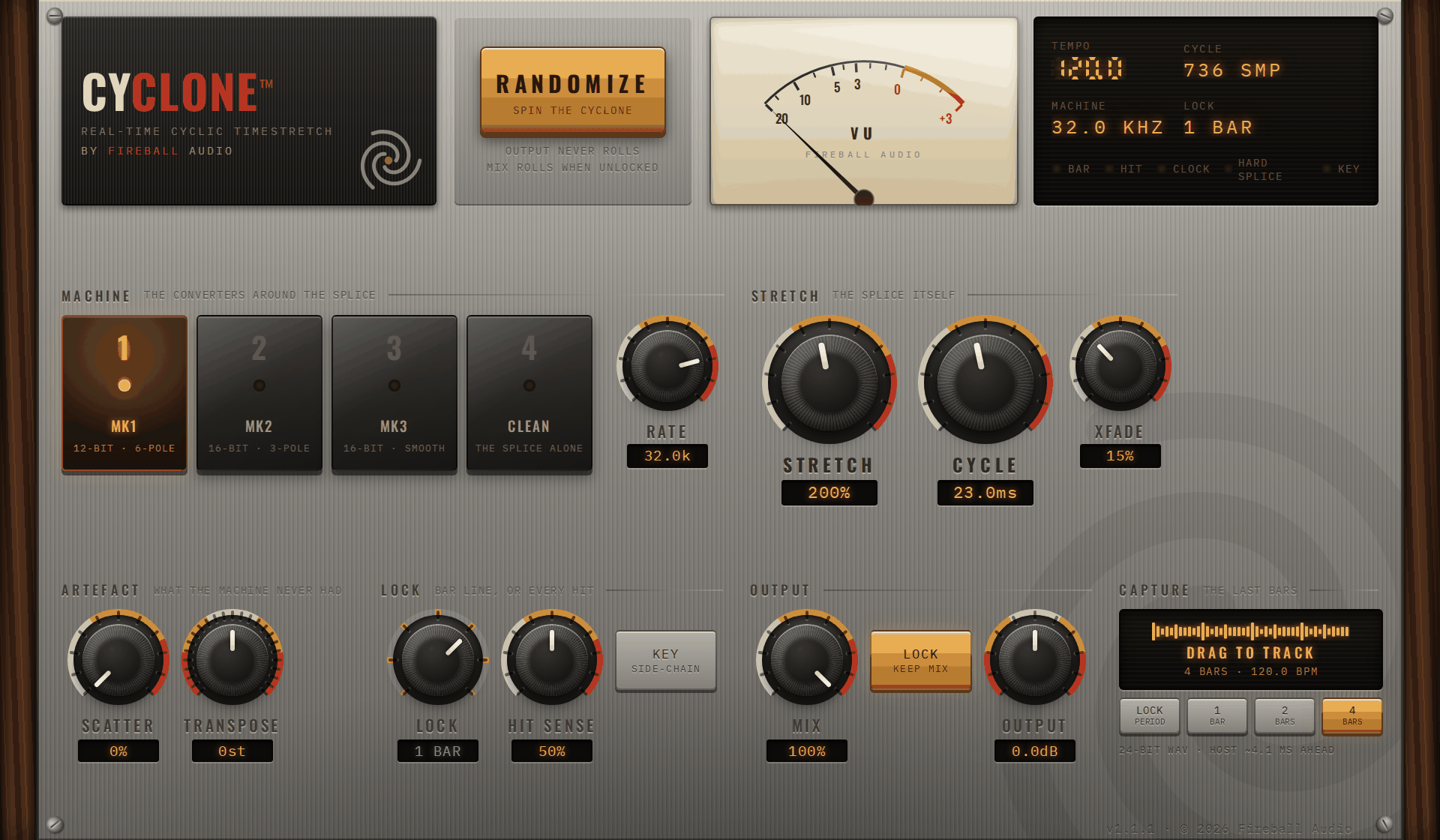
What is in the box
The splice
Fixed-length cycles read from the live input, the read point stepping by hop over stretch. No searching for a smooth join, on purpose: the joins are the sound.
The machines
12-bit and 16-bit converter chains around the same splice: word length, sample rate, held or interpolated playback, and filters that track the rate.
The lock
The stretch restarts on your bar lines and on every hit it hears, so a break stays on the grid at any stretch — the thing no machine and no offline stretcher can do.
The deglitcher
Hard splices ring instead of click; overlaps keep their level; the octave up does not alias. The character stays, the damage goes.
Capture
Press the pad, drag onto a track: the last bars of what you just heard, cut on the bar line, as a 24-bit WAV. What the machine did is now a region you can chop.
The key
A side-chain input for the hit detector. Lock the stretch to a kick from another track, or to a pattern the loop never had.
One drawing, measured twice per control
Every picture below is the same drawing: one bar of a break run through Cyclone's own engine at the two settings named underneath it, everything else at Init. Read one and you can read them all by looking only at what changed.
Machine
the converters around the spliceModel
Four machines, one splice. The stretch arithmetic is identical on all of them; what changes is everything around it. MK1 is the 12-bit machine — gritty, dark, its output held at the machine clock and smoothed by a steep filter. MK2 and MK3 are the 16-bit machines that followed, cleaner and brighter, MK3 with the smoother crossfade of the later revisions. CLEAN is the splice with nothing around it.
Rate
The machine's sample rate. Lower it and the top of the sound goes — and because CYCLE is counted in the machine's own samples, the ring drops with it. Around 32 kHz is the classic setting; under 12 kHz it turns into the dusty, underwater end of the machine.
Stretch
the splice itselfStretch
How far each moment is stretched. At 200 % the first half of every LOCK period is played across the whole of it; at 600 % the first sixth. The machine did not interpolate — it repeated little cycles of the sound — and that is what you hear: the break smeared into a rhythmic flutter.
Cycle
The length of the little pieces the stretch is built from. Long cycles are a slow tremolo — you hear each repeat as an echo. Short cycles are the metallic ring, a pitch of its own under the break. This is the control that makes it sound like the machine.
XFade
How each piece hands over to the next. Low settings keep the edge of the splice — the grain of the machine. Higher settings blur the pieces into each other until the stretch sounds like a wash. It never gets quieter as you turn it up: the overlap is level-matched.
Artefact
what the machine never hadScatter
Moves each piece a little earlier or later than the arithmetic says. A touch loosens the flutter into something that breathes; a lot turns the stretch into a granular spray. The machine never had this — it is here because it is fun.
Transpose
Plays the pieces faster or slower, the way the machine changed its clock. +12 at 200 % puts the break back at its real speed, an octave up and metallic — the jungle move. Down makes it heavy and slurred.
Lock
bar line, or every hitLock
How often the stretch lets go and starts again from now, in bars and beats of your session. 1 BAR is the classic: the first part of each bar stretched across the bar. 1/4 and 1/8 turn it into a stutter that never drifts off the grid. Pressing play, a cycle-loop wrap and every locate start it fresh on the downbeat.
Hit Sense
Every hit that stands out by more than this starts the stretch again, so the drums stay on time while everything between them stretches. Low catches kicks and snares; high catches every hat and ghost note. Off is the machine exactly as it was.
Hit Source
What the hit detector listens to. SELF is the track itself. KEY is the side-chain input: feed it a kick, a hat pattern or a rhythm from another track and the stretch restarts on that instead — the loop stays locked to a groove it does not contain. Nothing from the key reaches the output; only its timing does. On the panel it is the KEY chip beside HIT SENSE; the KEY lamp on the display lights while the detector is listening to the side-chain and something is arriving.
Output
Mix
Stretched against dry. At zero the plugin is a perfect bypass — the same samples, delayed by the latency your DAW already removes. RANDOMIZE leaves MIX where you set it unless you unlock it.
Output
Level after everything. RANDOMIZE never touches it.
Drag the last bars onto a track
What the machine just did, as a region: cut on the bar line, latency-corrected, a 24-bit WAV.
- Choose a lengthUnder CAPTURE, press LOCK, 1, 2 or 4 BARS. Cyclone keeps the last 40 seconds of its output and knows where every bar line fell in it.
- Press and dragPress the pad and drag onto an empty part of an audio track. The pad shows the bars it is holding while you drag; let go and the region lands on the track, named with the tempo, length and settings.
- Where the file isEvery capture is also saved as a 24-bit WAV under Music › Fireball Audio › Cyclone Captures. Nothing is deleted after a drag, so a project that references the file rather than copying it keeps its audio.
- With the transport stoppedThe pad still works: it takes the last bars' worth of seconds at the last tempo, not cut on a bar line. The region name then ends in “free”.
Lock the stretch to another track
HIT SOURCE = KEY: the detector listens to the side-chain and the loop restarts on a groove it does not contain.
Logic Pro
Insert Cyclone on the loop's track. In the plug-in header, the Side Chain menu lists every track and bus: choose the kick, hat or rhythm track. Press the KEY chip beside HIT SENSE so it lights (that is HIT SOURCE = KEY; SELF when it is off). The KEY lamp lights when the side-chain is arriving and being listened to.
Ableton Live
Cyclone (VST3) shows a side-chain section when the device is unfolded: choose the audio from a track and press the KEY chip.
Other hosts
Route a track to Cyclone's second input (“Key”); Cubase, Reaper, Studio One and Bitwig each have a side-chain or “input 3/4” option on the plug-in. A host that offers no side-chain leaves the detector on the track itself, whatever the KEY chip says.
What KEY does
Only the timing of the key is used: each hit on the side-chain restarts the stretch, half a millisecond before the attack. None of the key's audio reaches the output.
Five places to start
The jungle octave
The break back at its own tempo, an octave up, ringing. Put it under the original and ride MIX.
Tape-stop smear
The first beat of each bar drawn out across the bar. Automate LOCK down to 1/4 for a build.
Ring-mod snare
Metallic, pitched and tight to the grid. Try it on a snare bus, not the whole loop.
Dusty half-time
A boom bap loop at half speed and an octave down, sitting behind the mix like an old record.
Stutter fill
Automate LOCK in the last bar before a drop; every step lands on the grid.
Measured
| Formats | Audio Unit, VST3 · macOS 10.15 or later · universal (Apple silicon and Intel) |
| Channels | Mono or stereo in, same out |
| Parameters | 12, all automatable, plus RANDOMIZE and the MIX lock |
| Latency | 4 ms look-ahead + 3 samples (195 samples at 48 kHz), reported to the host |
| Stretch | 100 – 800 % |
| Cycle | 2 – 200 ms, whole machine samples |
| Machine rate | 7.5 – 48 kHz, continuously variable |
| Lock | 1/16 · 1/8 · 1/4 · 1/2 · 1 BAR · 2 BARS · 4 BARS |
| Overlapping cycles | up to 12, level-matched |
| Sample rates | 22.05 – 192 kHz |
| CPU | about 3.3 % of one core at 48 kHz, worst case (measured on a cloud server; a Mac is faster) |
| Copy protection | None |